Follow the easy steps to Login on Done555
How to Register and Login on Done55 Game
Download the Done555 APK
Before registering, the Done555 app needs to be installed on your Android device. Download the official APK from the Done555 platform, install it following the standard Android APK installation process, and open the app.
Tap the Register Button
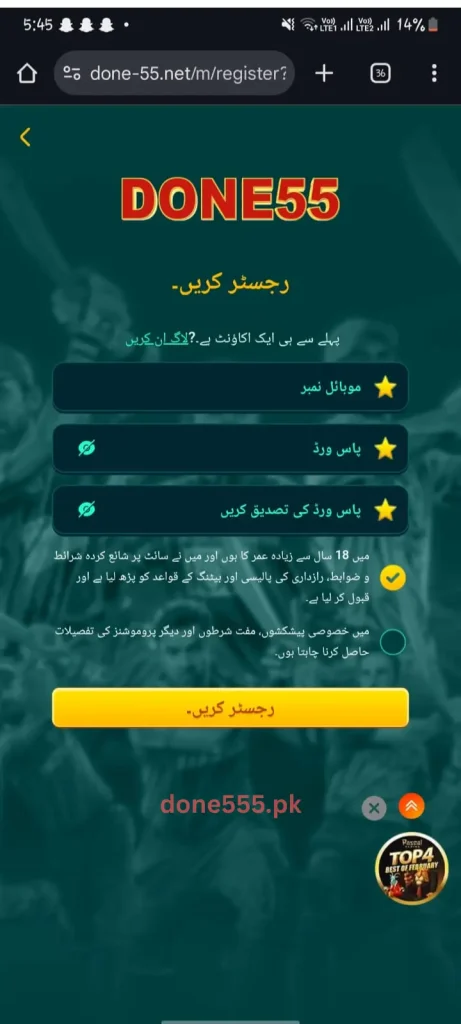
On the Done555 home screen, tap the Register or Sign Up button. This opens the new account creation form where personal details are entered.
Enter Your Phone Number
A valid Pakistani mobile number is required for registration. This number becomes the primary account identifier and is also used for account recovery if the password is ever forgotten. Enter the number carefully to avoid errors.
Create a Strong Password
Choose a password that is unique to Done555 and not reused from other apps or accounts. A strong password combines letters, numbers, and special characters. Write it down somewhere safe, account recovery without the correct phone number and password can be time-consuming.
Enter a Referral Code
If a friend or agent shared a referral code before signup, enter it in the referral code field during registration. This may unlock additional bonus balance for the new account on top of the standard welcome bonus. If no referral code is available, this step can be skipped.
Confirm and Submit Registration
Review all entered details, confirm they are correct, and tap the Submit or Register button. The account is created within seconds and the welcome bonus credits to the wallet immediately.
Set Up Payment Details
After registration, navigate to the wallet or payment section and link an Easypaisa or JazzCash account. Adding payment details early ensures withdrawals can be processed without delays when the time comes to cash out earnings.
Enable Account Security Features
Before playing any games, enable all available account security features password protection, login verification, and any two-step authentication options the app offers. These features protect the account and the wallet balance from unauthorized access.
What Happens Right After Registration?
The first few minutes after a Done555 account is created are the most bonus-rich period of the entire user journey. Here is what to do immediately after signup to maximize early value:
Claim the welcome bonus first. Before depositing or playing, locate the welcome bonus in the promotions or wallet section and claim it if it requires manual activation. Some bonuses credit automatically while others need a single tap to collect.
Explore the lucky spin wheel. New accounts often have spin wheel attempts available immediately after registration. Use these before doing anything else — they cost nothing and can add meaningful balance to the starting wallet.
Check available tasks. Done555 assigns tasks to users that reward bonus balance upon completion. Review the task list right after registration and identify which ones can be completed quickly for immediate rewards.
Share your referral link. The referral link is active from the moment the account is created. Sharing it immediately — even before making a deposit — means referral commissions can start accumulating while the new user is still exploring the platform.
Done555 Registration — Important Tips
Use your real phone number. The registered number is tied to account recovery and payment verification. Using a temporary or incorrect number creates complications when withdrawing earnings or recovering a lost password.
Never share your login credentials. Once the account is created, keep the password strictly private. Done555 staff will never ask for a password — any message requesting login details is a scam attempt.
Download only from the official source. Accounts created through unofficial or modified versions of the Done555 app may not qualify for bonuses or may carry security risks. Always register through the legitimate platform.
Link payment details early. Many new users make the mistake of waiting until they want to withdraw before linking Easypaisa or JazzCash. Adding payment details immediately after registration removes any last-minute friction when requesting a payout.
Use a referral code if available. A referral code entered at registration can add extra bonus balance that would not otherwise be available. If a friend or community member shared a code, using it during signup rather than skipping it is always the smarter choice.
Common Registration Problems and Quick Fixes
Phone number already registered: If the number entered shows as already in use, either a previous account exists under that number or the number was entered incorrectly. Try account recovery using the same number or double-check for digit errors.
Registration page not loading: Usually a connectivity issue. Switch from mobile data to WiFi or vice versa, clear the app cache, and try again. If the problem persists, reinstall the APK from the official source.
Referral code not accepted: Referral codes are case-sensitive and time-limited in some cases. Confirm the code is entered exactly as shared and that it has not expired. If the code still fails, contact Done555 support through in-app chat.
Welcome bonus not credited: Check the promotions section for any manual claim requirement. If the bonus is not visible at all, contact customer support with the registered phone number and registration timestamp for quick resolution.
FAQs
Is Done55 registration really free?
Yes, completely free. No payment, no subscription, and no deposit is required to create an account.
Can I register without a referral code?
Yes. The referral code field is optional during registration. Skipping it does not affect standard welcome bonuses.
How many accounts can one person create?
Done555 permits one account per user. Creating multiple accounts violates platform terms and can result in permanent account suspension.
Can I change my registered phone number later?
Phone number changes typically require contacting customer support with identity verification. It is not a self-service option in most cases.
How long does registration take?
Under two minutes from opening the registration form to having a fully active account with welcome bonus credited.
Conclusion
Every player on Done555 game started exactly where you are right now one registration away from real cash games, referral income, daily bonuses, and fast Easypaisa and JazzCash withdrawals. The process is free, the steps are simple, and the welcome bonus is ready to credit the moment signup is complete. Tap register, complete the form in under two minutes, and start your Done555 journey today the bonus clock starts the moment your account goes live.